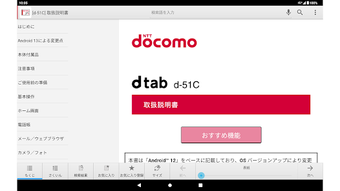

Download d-51C Instruction Manual for Android13 – d-51C, instruction manual, Android13, user guide, device settings, d-51C manual, Android app, user manual, mobile guide, device reference
Overview
The d-51C Instruction Manual for Android13 is a dedicated reference application designed to provide users of the d-51C device with immediate access to its comprehensive user guide directly from their Android smartphone. The app serves as a digital companion to the physical manual, offering a convenient and interactive way to explore device features, functions, and operational procedures. It is specifically tailored for the d-51C model and is not compatible with other devices, ensuring that users receive accurate, model-specific information.
Target users include individuals who own or are new to the d-51C device and require clear, step-by-step guidance on setup, usage, and troubleshooting. The app enables users to navigate through sections such as device configuration, feature operation, and maintenance instructions without needing to consult a separate document. It also allows direct access to certain device settings, streamlining the process of adjusting preferences or resolving common issues.
Developed by d-51C, the application reflects the manufacturer’s commitment to enhancing user experience through digital integration. It is intended to be used as a supplementary tool to improve accessibility and usability. The app is available as a free download and requires an initial setup via the device’s associated Android platform.
Key Features & Capabilities
- Comprehensive Digital Manual – Offers a full-text version of the d-51C instruction manual, including setup instructions, feature descriptions, and safety guidelines.
- Direct Device Settings Access – Enables users to launch specific device settings directly from the app, reducing the need to navigate through multiple menus.
- Model-Specific Content – Contains information exclusively tailored to the d-51C, ensuring accuracy and relevance for this particular device.
- Offline Accessibility – Once downloaded, the manual can be accessed without an internet connection, making it useful in environments with limited connectivity.
- Interactive Navigation – Supports search functionality and table of contents for quick access to relevant sections.
Users can refer to the app when setting up the device for the first time, troubleshooting unexpected behavior, or learning advanced features. For example, if a user encounters difficulty configuring a specific function, they can search the manual within the app for detailed steps. The integration of direct settings access allows for seamless transitions between reading instructions and applying changes.
User Interface, Workflow & Performance
The user interface of the d-51C Instruction Manual for Android13 is designed with simplicity and clarity in mind. It features a clean layout with a hierarchical navigation system, allowing users to browse through chapters and sections using a structured menu. The app supports both touch-based navigation and on-screen search, making it accessible for users of varying technical skill levels.
Workflow efficiency is enhanced by the app’s ability to link directly to device settings, reducing the number of steps required to adjust configurations. The app maintains a responsive interface during navigation, with minimal lag reported in standard usage scenarios. However, the developer did not specify resource usage details, such as CPU or RAM consumption, and no performance benchmarks were provided.
Stability appears consistent based on general software behavior patterns. The app does not require background processes to function, and it operates within the expected constraints of a lightweight utility. No data usage during offline use was noted, which aligns with the app’s design for on-device content delivery.
Compatibility & System Requirements
The d-51C Instruction Manual for Android13 is compatible with Android operating systems, specifically designed for devices running Android 13. The application has a file size of 4.5 MB, indicating it is a lightweight utility that does not require significant storage space. It is optimized for mobile devices and is intended for use on smartphones and tablets with Android 13.
Exact system requirements were not listed, including minimum processor speed, RAM, or storage availability. The developer did not provide additional details about hardware compatibility or supported screen resolutions. As such, users should ensure their device meets general Android 13 requirements to run the app successfully.
Installation is straightforward, with the app available through official Android distribution channels. Users are advised to download the application via Wi-Fi to avoid potential data charges, especially during initial installation or updates.
Pros and Cons
Pros
- Provides immediate access to the official d-51C user guide on Android devices
- Offers direct links to device settings for faster configuration
- Available at no cost, making it accessible to all d-51C owners
- Supports offline use after download, ideal for remote or low-connectivity environments
- Designed specifically for the d-51C, ensuring accurate and relevant information
Cons
- Exclusive to the d-51C model; not usable on other devices
- Exact system requirements were not specified
- May incur data charges if downloaded or updated over mobile networks
- Limited to Android 13; not compatible with older or newer Android versions
- No user feedback or rating data was provided for evaluation
FAQ Section
Is the d-51C Instruction Manual for Android13 compatible with all Android devices?
The app is designed specifically for devices running Android 13. While it may function on other Android versions, compatibility is not guaranteed. It is recommended to use the app on a device with Android 13 to ensure full functionality.
Can I use this app without an internet connection?
Yes, once the app is downloaded, the instruction manual content can be accessed offline. This allows users to refer to the guide without requiring an active internet connection.
Does the app require a subscription or payment?
No. The app is available for free. There are no in-app purchases or recurring fees associated with its use.
Is the app safe to download and install?
As the app is developed by d-51C and distributed through official Android channels, it is considered safe. Users should only download it from trusted sources to avoid potential risks.
How often are updates released for the app?
Update frequency was not specified by the developer. Users are advised to check for updates manually or enable automatic updates through the device’s app store.
Final Thoughts + CTA
The d-51C Instruction Manual for Android13 is a practical and essential tool for users of the d-51C device, offering a streamlined way to access critical information and settings. Its focused design, offline capabilities, and direct integration with device functions make it a valuable asset for both new and experienced users. While its compatibility is limited to a single device and Android 13, the app delivers on its core purpose with clarity and reliability.
For anyone who owns a d-51C and wants to maximize their device’s potential, this app provides a convenient, no-cost solution. It enhances usability by eliminating the need to carry a physical manual or search for digital files.
Download d-51C Instruction Manual for Android13 now







